Sanity plugin color input
A beautifully designed color picker for Sanity Studio (v3, v4, v5, and v6). Pick solid colors, build linear gradients, or control opacity using the Alpha channel. Outputs HEX, 8-digit HEX, RGBA, HSL, and OKLCH values with one-click copy.
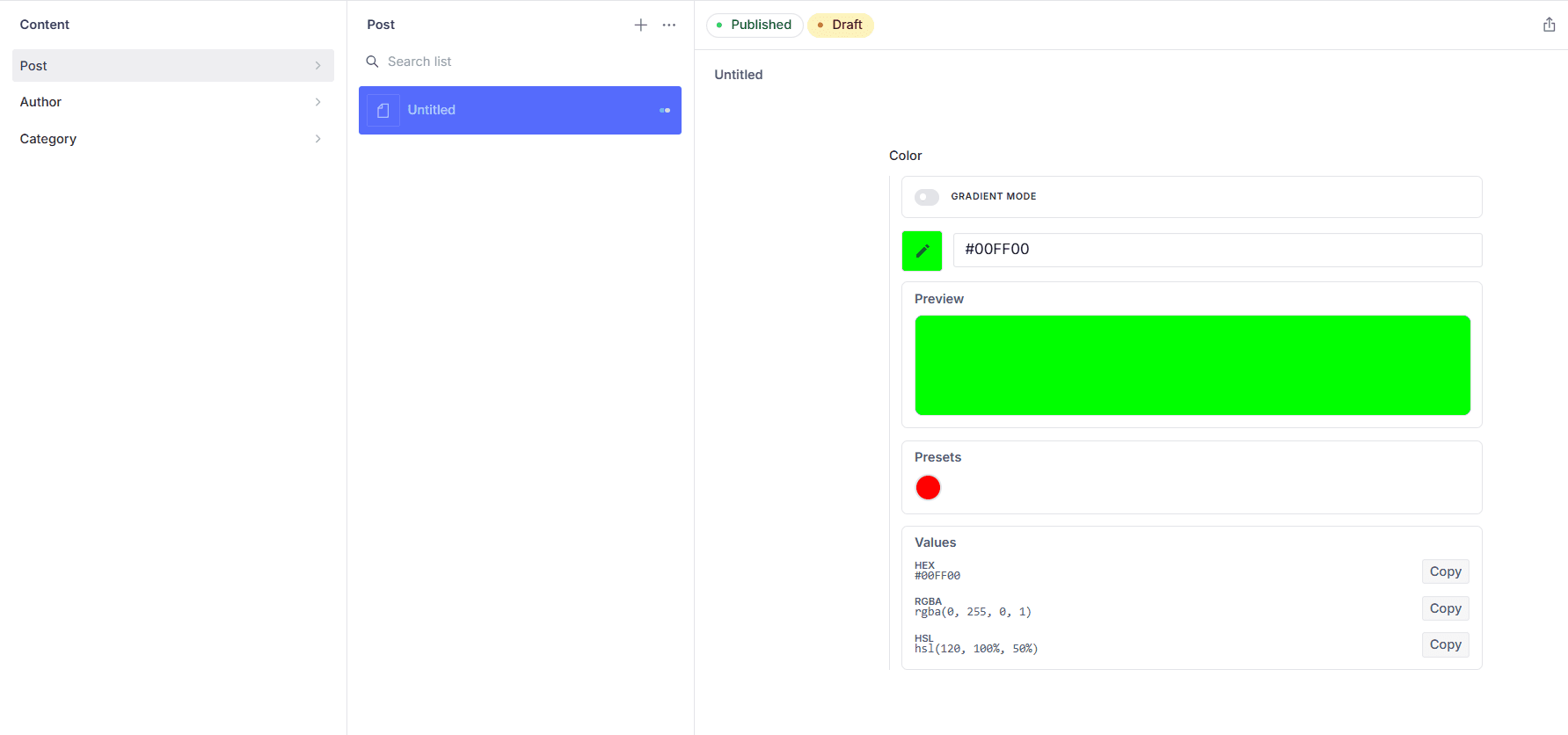
Solid Color Picker
A highly intuitive color picker for Sanity Studio that supports HEX, RGB, HSL, and modern OKLCH color formats.
Gradient Color Picker
Create stunning gradients with multiple colors, adjustable angles, and real-time preview in a user-friendly interface.
Alpha Channel Support
Toggle opacity sliders to select transparent or semi-transparent colors. Outputs standard or 8-digit HEX, RGBA, and HSLA formats.
Visual color picker
A sleek, modern user interface for precise color selection.
Gradient support
Toggle between solid colors and linear gradients with configurable angle.
Rich output formats
Stores HEX, RGBA, and HSL for solid colors, full CSS linear-gradient() strings for gradients.
Customizable presets
Ship your brand palette or use the built-in presets; override per field.
One-click copy
Editors can copy any format (HEX, RGBA, HSL, CSS gradient) instantly.
Portable Text support
Drop it into rich text annotations as a highlight color.
Get started in minutes
Follow these simple steps to add the color picker plugin to your Sanity Studio.
Installation
Install the plugin using your preferred package manager.
npm install sanity-plugin-color-input
# or
yarn add sanity-plugin-color-input
# or
pnpm add sanity-plugin-color-inputSetup
Register the plugin in your sanity.config.ts (or .js):
import { defineConfig } from 'sanity'
import { customColorPicker } from 'sanity-plugin-color-input'

export default defineConfig({
  // ...other config
  plugins: [
    customColorPicker(),
  ],
})Basic Usage
Once the plugin is registered, use type: 'color' in any document schema:
export default {
  name: 'myDocument',
  title: 'My Document',
  type: 'document',
  fields: [
    {
      name: 'brandColor',
      title: 'Brand Color',
      type: 'color',
    },
  ],
}Field Options
Override default presets, provide brand colors, enable alpha channel, or hide specific UI elements (like presets or copy buttons) directly on the field:
{
  name: 'brandColor',
  title: 'Brand Color',
  type: 'color',
  options: {
    disablePresets: true,
    disableCopyValues: true,
    enableAlpha: true, // Show opacity sliders
    colors: [
      // Solid colors
      '#1A1A1A',
      '#F5F5F5',
      '#0047FF',
      // Gradient preset: two colors + angle in degrees
      { hex: '#E91E63', hex2: '#2196F3', angle: 45 },
    ],
  },
}Solid Color
// Without Alpha (Default)
{
  "_type": "color",
  "hex": "#f44336",
  "rgba": "rgba(244, 67, 54, 1)",
  "hsl": "hsl(4, 90%, 58%)",
  "oklch": "oklch(62.8% 0.258 29.2)",
  "isGradient": false
}

// With Alpha (enableAlpha: true)
{
  "_type": "color",
  "hex": "#f44336d6",
  "rgba": "rgba(244, 67, 54, 0.84)",
  "hsl": "hsla(4, 90%, 58%, 0.84)",
  "oklch": "oklch(62.8% 0.258 29.2 / 0.84)",
  "isGradient": false
}
Gradient
// Without Alpha (Default)
{
  "_type": "color",
  "hex": "#f44336",
  "hex2": "#000000",
  "angle": 180,
  "rgba": "rgba(244, 67, 54, 1)",
  "hsl": "hsl(4, 90%, 58%)",
  "oklch": "oklch(62.8% 0.258 29.2)",
  "isGradient": true,
  "css": "linear-gradient(180deg, #f44336, #000000)"
}

// With Alpha (enableAlpha: true)
{
  "_type": "color",
  "hex": "#f44336d6",
  "hex2": "#000000ff",
  "angle": 180,
  "rgba": "rgba(244, 67, 54, 0.84)",
  "hsl": "hsla(4, 90%, 58%, 0.84)",
  "oklch": "oklch(62.8% 0.258 29.2 / 0.84)",
  "isGradient": true,
  "css": "linear-gradient(180deg, #f44336d6, #000000ff)"
}Use isGradient to branch your rendering logic on the frontend. For gradients, the css field gives you a ready-to-use CSS value — pass it directly to a background or background-image property.
Highlight Annotation Schema
Add a color field inside a Portable Text marks.annotations entry to let editors apply highlight colors to text selections:
export default {
  name: 'richText',
  title: 'Rich Text',
  type: 'array',
  of: [
    {
      type: 'block',
      marks: {
        annotations: [
          {
            name: 'highlight',
            type: 'object',
            title: 'Highlight',
            fields: [
              {
                name: 'color',
                type: 'color',
                title: 'Color',
              },
            ],
          },
        ],
      },
    },
  ],
}
Stored Portable Text Output
When an editor applies a highlight, the color data is stored within the markDefs array:
{
  "_key": "2ef685a16342",
  "_type": "block",
  "children": [
    {
      "_key": "4b929316bf10",
      "_type": "span",
      "marks": ["f9bfae1005c4"],
      "text": "Learning Platform"
    }
  ],
  "markDefs": [
    {
      "_key": "f9bfae1005c4",
      "_type": "highlight",
      "color": {
        "_type": "color",
        "hex": "#cddc39",
        "hsl": "hsl(66, 70%, 54%)",
        "oklch": "oklch(84.7% 0.199 119.5)",
        "isGradient": false,
        "rgba": "rgba(205, 220, 57, 1)"
      }
    }
  ]
}React — Solid or Gradient Background
Render a color swatch that handles both solid and gradient values.
export interface SanityColor {
  _type: 'color'
  hex: string
  rgba: string
  hsl: string
  oklch?: string
  isGradient: boolean
  hex2?: string
  angle?: number
  css?: string
}

function ColorSwatch({ color }: { color: SanityColor }) {
  const background = color.isGradient ? color.css : color.hex
  return (
    <div style={{ background, width: 48, height: 48, borderRadius: 8 }} />
  )
}Groq Query
Use GROQ projections to fetch color data efficiently from your Sanity dataset.
// Gradient-aware
*[_type == "myDocument"][0] {
  brandColor {
    _type,
    angle,
    css,
    hex,
    hex2,
    hsl,
    isGradient,
    oklch,
    rgba
  }
}SanityColor Type
Use this type to strongly type your color field values in frontend code.
export type SanityColor = {
  _type: 'color'
  hex: string
  rgba: string
  hsl: string
  oklch?: string
  isGradient: boolean
  hex2?: string
  angle?: number
  css?: string
}Sanity Studio
Node.js
Common Questions
Everything you need to know about the color picker plugin and how to use it in your Sanity Studio projects.
The color input plugin works seamlessly with Sanity Studio v3, v4, v5, and v6. It's fully compatible with all recent versions and will continue to be updated as new Sanity releases come out.
You can easily override the default color presets by providing your own colors array in the field options. This is perfect for restricting choices to your brand-specific color palettes and ensuring consistency across your content.
The plugin supports HEX (6 or 8 digits), RGBA, HSL, HSLA, and modern OKLCH color space formats for solid colors. For gradients, it provides complete CSS linear-gradient strings with optional alpha channel/opacity support, making it easy to use in any web project.
You can enable the alpha channel/opacity sliders globally via the plugin configuration `customColorPicker({ enableAlpha: true })`, or individually on a per-field basis by setting `options: { enableAlpha: true }` in your schema definition.
Absolutely! The plugin includes full gradient support. Toggle between solid colors and linear gradients, customize angles, and get the complete CSS gradient code with one click copy functionality.
Yes! The plugin includes one-click copy functionality for HEX, RGBA, HSL, OKLCH, and CSS gradient values. Your selected color values are instantly copied to the clipboard for easy pasting into your projects.
The sanity-plugin-color-input is open source under the MIT license. You can freely use, modify, and distribute it in your projects. Check the GitHub repository for the full license details.
Ready to add color to your Sanity Studio?
The color picker plugin is free, open source, and production-ready. Install it today and streamline your content creation workflow.